This guide extends the Quickstart Guide, so make sure you have completed that before starting with ArgoCD.
Adding ArgoCD#
In order to be able to deploy nplus instances using ArgoCD, you need to add the Chart Repository to Argo:
cat << EOF | kubectl apply -f -
apiVersion: v1
kind: Secret
metadata:
  name: nplus-repo
  namespace: argocd
  labels:
    argocd.argoproj.io/secret-type: repository
stringData:
  type: helm
  url: https://git.42i.org/api/packages/nplus/helm
  password: $NPLUS_TOKEN
  username: $NPLUS_ACCOUNT
EOF
This requires the Environment Variables for the NPLUS_ACCOUNT and NPLUS_TOKEN to be set. Check the Quickstart Guide if you are uncertain
Now you are good to go adding an instance using ArgoCD. We will re-use the myinstance.yaml we created during the Quickstart Guide. You will also find it in Samples.
helm upgrade -i \
  --values myinstance.yaml \
  myinstance-argo nplus/nplus-instance-argo
The only difference with ArgoCD is, that we use a different Chart for the instance: nplus-instance-argo.
The settings / values file is identical.
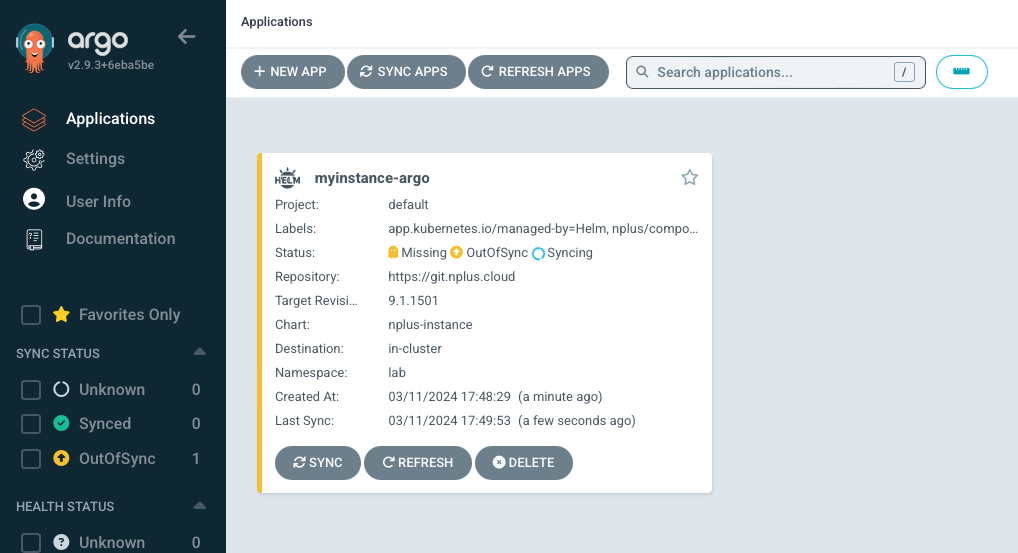
ArgoCD will automatically pick up the new instance and start installing it.
You can check via command line
 # kubectl get instance
NAME              HANDLER   VERSION    TENANT    STATUS
myinstance        Helm      9.1.1501   default   healthy
myinstance-argo   argoCD    9.1.1501   default   healthy
Or via agroCD Web UI the current status of the deployment
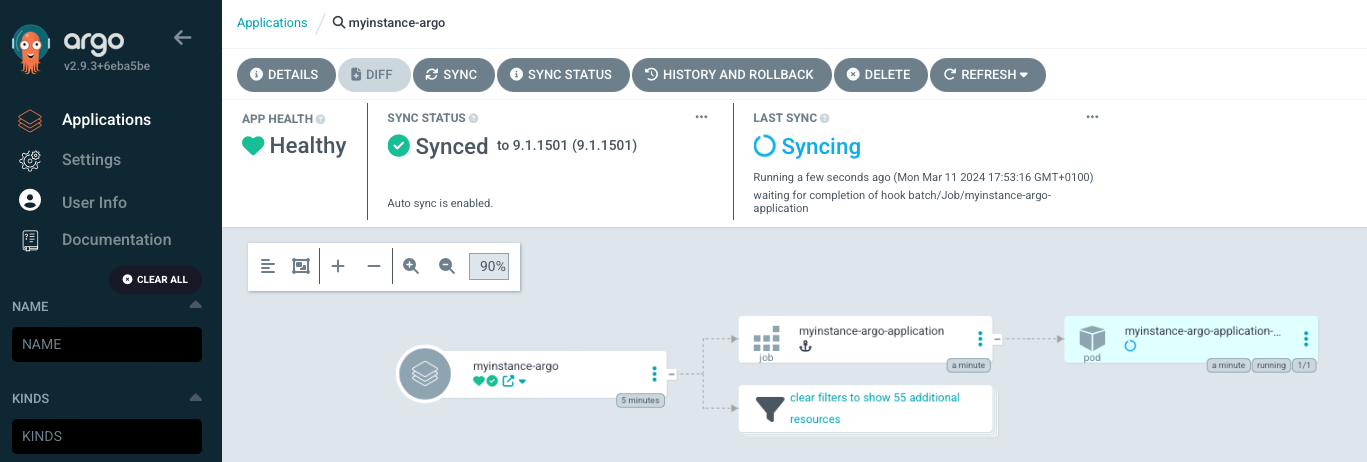
The Instance will report healthy in argoCD as well as using command line, even though the SBS Installer is not ready yet (as Applications are installed asynchronously as soon as the instance is healthy)
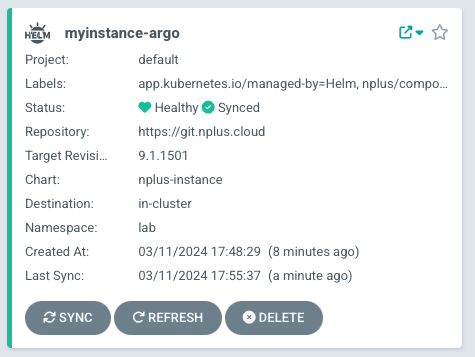
As soon as the Application Installer is done, it looks like this:
Monitoring ArgoCD#
ArgoCD also has a custom resource, called application. The nscale argoCD Resources are created in the argocd Namespace. You can get them by
# kubectl get app -n argocd
NAME              SYNC STATUS   HEALTH STATUS
myinstance-argo   Synced        Healthy
Of course you can also check with
# kubectl get instances
NAME              HANDLER   VERSION    TENANT    STATUS
myinstance        Helm      9.1.1501   default   healthy
myinstance-argo   argoCD    9.1.1501   default   healthy
But if you require detailed information, the best is to start describing the argoCD App:
# kubectl describe app myinstance-argo -n argocdThis gives you a much higher level of detail.
Troubleshooting ArgoCD#
Cache#
ArgoCD caches helm Chart content. This can be a problem especially during development, when you might now always increase version numbers.
Then, you might want to hard reset an argoCD Appication to void the cache:
kubectl patch app/myinstance-argo -n argocd --type merge -p='{"metadata": {"annotations":{"argocd.argoproj.io/refresh": "hard"}}}'Finalizer#
Finalizers in Kubernetes are taking care of cleanup tasks. Sometimes, these finalizers in argoCD get stuck on deleting complex nplus instances. As a last option, you might want to try removing the finalizer and then cleaning the instance up manually:
kubectl patch app/myinstance-argo -n argocd \
    --type json \
    --patch='[ { "op": "remove", "path": "/metadata/finalizers" } ]'
Then delete the argoCD Application:
kubectl delete app/myinstance-argo -n argocdSince the finalizer did not clean up, all nplus instance parts are still there. Luckily, they are labeled, so easy to identify:
kubectl get all,pvc,ing -l nplus/instance=myinstance-argoWe can now use this list to delete everything:
kubectl delete $(kubectl get all,pvc,ing -l nplus/instance=myinstance-argo -o name)ArgoCD does not use helm to install but rather get the helm template and renders it internally. So there is no need to clean up helm after removing the argo app.
Default Waves#
The instance chart has some default waves defined. You can use them or overwrite the values with your own demands:
- wave 1: prepper
- wave 2: requirements: nstl, database
- wave 3: essential services: rs, nappljobs, nappl (standalone, if jobs are enabled)
- wave 4: hook: free to use for anything that needs to be done before the cluster starts
- wave 5: consumer services: nappl (serving consumers) if jobs are disabled
- wave 6: consumer services: web
- wave 7: peripheral services: mon, pipeliner, ilm, cmis, webdav, sharepoint
- wave 8: tools: administrator, pam
- wave 9: tools: rms (Remote Management Server)
- wave 10: solutions: application (incl. GBAs)