K8s namespace aka nplus environment#
nplus instances are deployed into K8s namespaces. Always. even if you do not specify a namespace, it uses a namespace: default.
In order to use this namespace for nplus instances, you need to deploy some shared nplus components into it, which are used by the instances. This is done by the environment chart:
helm install \
  --values demo.yaml \
  demo nplus/nplus-environment
After that, the K8s namespace is a valid nplus environment that can house multiple nplus instances.
deploying assets into the environment#
Most likely, you will need assets to be used by your instances. Fonts for example: The nscale Rendition Server and die nscale Server Application Layer both require the Microsoft fonts, that are not allowed to be distributed by neither nscale nor nplus. So this example shows how to upload some missing pieces into the environment:
kubectl cp ./apps/app-installer-9.0.1202.jar nplus-toolbox-0:/conf/pool
kubectl cp ./fonts nplus-toolbox-0:/conf/pool
kubectl cp ./copy-snippet.sh nplus-toolbox-0:/conf/pool/scripts
kubectl cp ./test.md nplus-toolbox-0:/conf/pool/snippets
kubectl cp ./snc nplus-toolbox-0:/conf/pool
Alternatively, you can also use a prepper component, that you can activate on the environment chart, to download assets from any web site and deploy them into the environment:
components:
  prepper: true
prepper:
  download:
    - "https://www.nplus.cloud/raw/assets/sample.tar.gz"
Please see the prepper README.md for more information.
Operator Web UI#
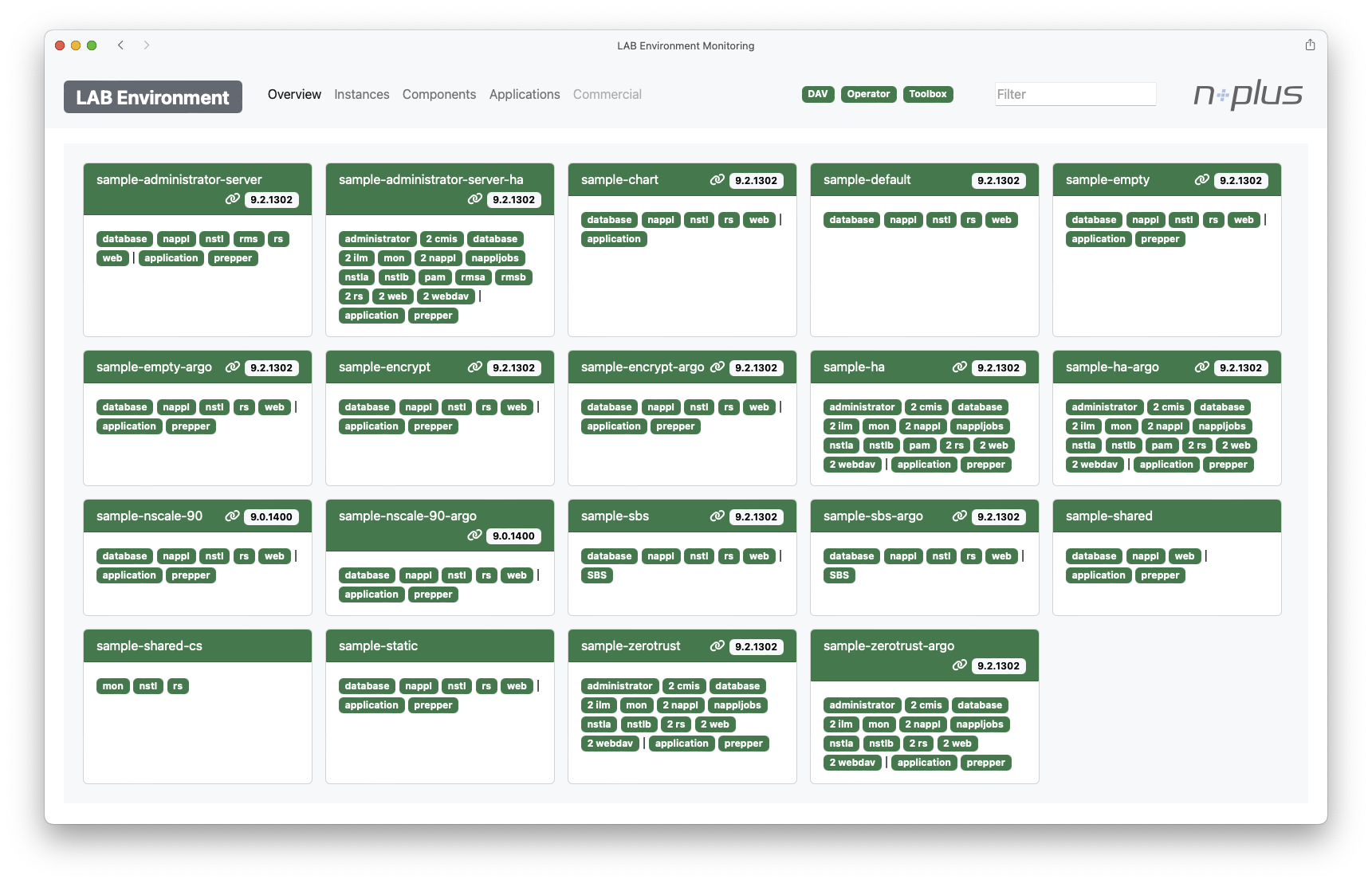
The environment comes with the operator, responsible for managing / controlling the custom resources. It has a Web UI, that can be enabled in the environment chart.
namespace-less manifests#
Speaking of namespaces: Sometimes you want to drop the namespace from your manifest. This can be done by
utils:
  includeNamespace: false
when you then call
helm template myInstance nplus/nplus-instance > myInstance.yamlthe manifest in myInstance.yaml will not have a namespace set, so you can apply it to multiple namespaces later:
kubectl apply --namespace dev -f myInstance.yaml
kubectl apply --namespace qa -f myInstance.yaml
kubectl apply --namespace prod -f myInstance.yamlFiles#
Download all files of this sample
build.sh#
#!/bin/bash
#
# This sample script builds the example as described. It is also used to build the test environment in our lab,
# so it should be well tested.
#

# Make sure it fails immediately, if anything goes wrong
set -e

# -- ENVironment variables:
# CHARTS: The path to the source code
# DEST: The path to the build destination
# SAMPLE: The name of the sample
# KUBE_CONTEXT: The name of the kube context, used to build this sample depending on where you run it against. You might have different Environments such as lab, dev, qa, prod, demo, local, ...
SAMPLE=environment

# Check, if we have the source code available
if [ ! -d "$CHARTS" ]; then
    echo "ERROR Building $SAMPLE example: The Charts Sources folder is not set. Please make sure to run this script with the full Source Code available"
    exit 1
fi
if [ ! -d "$DEST" ]; then
    echo "ERROR Building $SAMPLE example: DEST folder not found."
    exit 1
fi
if [ ! -d "$CHARTS/environment" ]; then
    echo "ERROR Building $SAMPLE example: Chart Sources in $CHARTS/environment not found. Are you running this script as a subscriber?"
    exit 1
fi

# Output what is happening
echo "Building $SAMPLE for $KUBE_CONTEXT"

# Create the manifest
mkdir -p $DEST/environment
helm template --debug --render-subchart-notes \
    --values $SAMPLES/$SAMPLE/$KUBE_CONTEXT.yaml \
$KUBE_CONTEXT $CHARTS/environment > $DEST/environment/$KUBE_CONTEXT.yamldemo.yaml#
toolbox:
  enabled: true
dav:
  enabled: true
nstoreDownloader:
  enabled: true
global:
  environment:
    utils:
      renderComments: true
    ingress:
      domain: "{{ .instance.group | default .Release.Name }}.demo.nplus.cloud"
      class: "public"
      issuer: "nplus-issuer"
    storage:
      conf:
        class: "cephfs"
      data:
        class: "ceph-rbd"
      disk:
        class: "ceph-rbd"
      file:
        class: "cephfs"
appInstaller: "/pool/app-installer-9.0.1202.jar"dev.yaml#
toolbox:
  enabled: true
dav:
  enabled: true
nstoreDownloader:
  enabled: true
global:
  environment:
    ingress:
      class: "ingress-internal"
      domain: "{{ .instance.group | default .Release.Name }}.dev.nplus.cloud"
      issuer: "nplus-issuer"
    storage:
      conf:
        class: "pv-af-auto"
      data:
        class: "pv-disk-auto"
      file:
        class: "pv-af-auto"
    appInstaller: "/pool/app-installer-9.0.1202.jar"
    security:
      illumio:
        enabled: true
        loc: "samples"
        supplier: "42i"
platform: "nplus.cloud"kind-lab.yaml#
toolbox:
  enabled: true
  nstoreDownloader:
    enabled: true
dav:
  enabled: true
nappl:
  ingress:
    enabled: true

# -- In the lab / dev environment, we quite often throw away the data disk while keeping the conf folder
# the default for the DA_HID.DAT is the conf folder, so they do not match any more.
# So we switch the check off here.
nstl:
  checkHighestDocId: "0"
nstla:
  checkHighestDocId: "0"
nstlb:
  checkHighestDocId: "0"

global:
  environment:
    ingress:
      domain: "{{ .instance.group | default .Release.Name }}.lab.nplus.cloud"
      class: "public"
      issuer: "nplus-issuer"
      whitelist: "192.168.0.0/16,10.0.0.0/8"
      namespace: ingress
    appInstaller: "/pool/app-installer-9.0.1202.jar"
    security:
      cni:
        defaultIngressPolicy: deny
        defaultEgressPolicy: deny
        createNetworkPolicy: true
excludeUnusedPorts: falselab.yaml#
toolbox:
  enabled: true
  nstoreDownloader:
    enabled: true
dav:
  enabled: true
nappl:
  ingress:
    enabled: true

# -- In the lab / dev environment, we quite often throw away the data disk while keeping the conf folder
# the default for the DA_HID.DAT is the conf folder, so they do not match any more.
# So we switch the check off here.
nstl:
  checkHighestDocId: "0"
nstla:
  checkHighestDocId: "0"
nstlb:
  checkHighestDocId: "0"

global:
  environment:
    ingress:
      domain: "{{ .instance.group | default .Release.Name }}.lab.nplus.cloud"
      class: "public"
      issuer: "nplus-issuer"
      whitelist: "192.168.0.0/16,10.0.0.0/8"
      namespace: ingress
    appInstaller: "/pool/app-installer-9.0.1202.jar"
    security:
      cni:
        defaultIngressPolicy: deny
        defaultEgressPolicy: deny
        createNetworkPolicy: true
excludeUnusedPorts: falselocal.yaml#
toolbox:
  enabled: true
dav:
  enabled: true
nstoreDownloader:
  enabled: true
global:
  environment:
    ingress:
      class: "nginx"
      domain: "{{ .instance.group | default .Release.Name }}.dev.local"
appInstaller: "/pool/app-installer-9.0.1202.jar"nodeport.yaml#
apiVersion: v1
kind: Service
metadata:
  name: nplus-operator-nodeport-access
spec:
  type: NodePort
  selector:
    nplus/component: operator
  ports:
    - port: 8080
      targetPort: 8080
nodePort: 31976nplus-lab.yaml#
# Environment values for the k3s test cluster "nplus-lab" (VM 185070 on s18p1).
# Used by test/installEnvironment via the kubectl context name.
# See docs/testumgebung.md for the cluster itself.
toolbox:
  enabled: true
  nstoreDownloader:
    enabled: true
dav:
  enabled: true
nappl:
  ingress:
    enabled: true

# The lab throws away the data disk from time to time while keeping the conf
# folder, so the DA_HID.DAT no longer matches. Switch the check off here.
nstl:
  checkHighestDocId: "0"
nstla:
  checkHighestDocId: "0"
nstlb:
  checkHighestDocId: "0"

global:
  environment:
    ingress:
      domain: "{{ .instance.group | default .Release.Name }}.nplus-lab.lan"
      # k3s ships Traefik - so this cluster runs the native Traefik CRDs
      provider: traefik
      class: traefik
      # no cert-manager here, the chart generates a self signed certificate
      issuer: ""
      createSelfSignedCertificate: true
      namespace: kube-system
      traefik:
        entryPoints:
          - websecure
        maxRequestBodyBytes: 52428800
        responseHeaderTimeout: 600s
    appInstaller: "/pool/app-installer-9.0.1202.jar"
    security:
      cni:
        # single node k3s with flannel - no CNI policies here
        createNetworkPolicy: false

# The default storage class of this cluster is NFS, because conf and ptemp
# need ReadWriteMany. A database does not - and PostgreSQL does not work on
# NFS (it fails with "could not open file global/pg_filenode.map"), so the
# data disk explicitly goes to the local storage class.
postgres:
  mounts:
    data:
      class: local-path
database:
  mounts:
    data:
      class: local-path

# The nscale images are NOT pinned here. This lab has a 10.1 test license, so
# the version is stacked on the deploy instead:
#
#   --values versions/10.1.1509.yaml
#
# see the pinning sample. Pinning matters here because the chart defaults point
# to "latest", which does not exist in the registry, and because a newer
# component rejects an older license outright ("The license version is not
# supported: 10.1").
#
# The server ids stay as the samples set them - a license that carries its own
# ServerId is the wrong license, because it pins the storage layer to one id.prod.yaml#
toolbox:
  enabled: true
  nstoreDownloader:
    enabled: true
dav:
  enabled: true
nappl:
  ingress:
    enabled: true

# -- In the lab / dev environment, we quite often throw away the data disk while keeping the conf folder
# the default for the DA_HID.DAT is the conf folder, so they do not match any more.
# So we switch the check off here.
nstl:
  checkHighestDocId: "0"
nstla:
  checkHighestDocId: "0"
nstlb:
  checkHighestDocId: "0"

global:
  environment:
    ingress:
      domain: "{{ .instance.group | default .Release.Name }}.lab.nplus.cloud"
      class: "public"
      issuer: "nplus-issuer"
      whitelist: "192.168.0.0/16,10.0.0.0/8"
      namespace: ingress
      # proxyReadTimeout: "360s"
    storage:
      conf:
        class: "cephfs"
      ptemp:
        class: "cephfs"
      data:
        class: "ceph-rbd"
      disk:
        class: "ceph-rbd"
      file:
        class: "cephfs"
    appInstaller: "/pool/app-installer-9.0.1202.jar"
    # repoOverride: cr.test.lan
    security:
      cni:
        defaultIngressPolicy: deny
        defaultEgressPolicy: deny
        createNetworkPolicy: true
        excludeUnusedPorts: false